
NVR servers provide a more flexible alternative to traditional NVR appliances. Instead of using a dedicated recorder with built-in PoE ports, you can use a NAS or server to store surveillance footage, run NVR/VMS software, manage IP cameras, and handle other workloads from the same system.
This guide is for homeowners, small businesses, and advanced users who want a flexible NVR server for IP cameras, with plenty of storage, fast networking, and room to expand.
TL;DR – Best NVR Servers (Quick Picks)
| Product | Best For | Main Advantage |
|---|---|---|
| QNAP TS-464-8G-US Check Price on Amazon | Best Overall | Excellent balance of storage, networking, expansion, and general-purpose server features |
| Synology DS1525+ Check Price on Amazon | Best Scalable | Five drive bays, expansion support, ECC memory, and strong surveillance capabilities |
| UGREEN DXP4800 Plus Check Price on Amazon | Best High-Performance | 10GbE networking, DDR5 memory, NVMe support, and high storage capacity |
| ASUSTOR Lockerstor 4 Gen2+ AS6704T v2 Check Price on Amazon | Best for High-Speed Networking | Dual 5GbE ports and four M.2 NVMe slots |
| HPE ProLiant MicroServer Gen11 Check Price on Amazon | Best Server-Grade | Xeon processor, DDR5 memory, PCIe expansion, and HPE iLO remote management |
If you’re looking for a traditional NVR rather than a server-based solution, please check our full guide on the Best NVR Security Camera Systems for complete NVR kits with cameras, PoE, and local recording.
Good to Know Before Buying
An NVR server is different from a traditional NVR appliance.
Most dedicated NVRs include built-in PoE ports, surveillance software, and a simple interface designed specifically for recording IP cameras. NVR servers, on the other hand, are usually NAS or general-purpose server platforms that require NVR/VMS software and separate networking equipment.
This approach provides considerably more flexibility. You can use the same server for surveillance recording, backups, file storage, media, applications, virtualization, and other workloads.
However, setup is generally more involved. You may need to configure the cameras, NVR software, storage, networking, and remote access yourself.
For surveillance, storage capacity is also important. Camera resolution, bitrate, frame rate, number of cameras, and recording retention determine how much storage you need.
How to Choose the Right NVR Server
When choosing an NVR server, focus on the hardware and features that matter most for your camera system.
Storage: Look for enough drive bays to hold the amount of surveillance footage you want to retain. Four or more bays provide more flexibility for larger systems and RAID configurations.
Networking: Gigabit Ethernet can handle many smaller camera systems, while 2.5GbE, 5GbE, and 10GbE provide more bandwidth for larger deployments and heavy file transfers.
Processor and RAM: The requirements depend heavily on the NVR/VMS software you use. More powerful processors and additional RAM are particularly useful when the server will also run applications, containers, virtual machines, or other workloads.
NVR/VMS software: Check that the software you plan to use supports your cameras and the features you need. ONVIF and RTSP support can make it easier to use cameras from different manufacturers.
Expansion: PCIe slots, M.2 NVMe slots, additional drive bays, and expansion units can extend the useful life of an NVR server as your requirements grow.
PoE: None of the servers in this guide are traditional PoE NVRs. If your cameras use PoE, you’ll generally need a separate PoE switch to connect and power them.
Best NVR Servers (Detailed Reviews)
1. QNAP TS-464-8G-US (Best Overall)

- Best for: Homeowners, small businesses, and advanced users who want a flexible NVR server that can also handle backups, file storage, applications, and other workloads.
- Not ideal if: You want a simple plug-and-play NVR with built-in PoE ports and minimal configuration.
The QNAP TS-464-8G-US is our Best Overall NVR Server thanks to its excellent combination of storage capacity, networking, expansion, and general-purpose server functionality.
The TS-464 is a 4-bay NAS server that can serve as the foundation for an NVR surveillance system. Instead of relying on a dedicated NVR appliance, it provides a flexible platform for storing surveillance footage, running applications, and managing other data from the same system.
Powered by an Intel Celeron N5105/N5095 quad-core processor and equipped with dual 2.5GbE networking, the TS-464 is well suited to users who want an NVR server that can do more than simply record camera footage.
Key Highlights
Storage
- 4 × 3.5-inch SATA 6Gb/s drive bays
- Hot-swappable drive support
- Diskless configuration
Performance & Networking
- Intel Celeron N5105/N5095 quad-core processor
- Up to 2.9 GHz burst frequency
- 8GB DDR4 RAM
- Supports up to 16GB DDR4 memory
- 2 × 2.5GbE network ports
Expansion
- 2 × M.2 2280 PCIe Gen 3 slots
- 1 × PCIe Gen 3 x2 expansion slot
- 2 × USB 3.2 Gen 2 ports
- 2 × USB 2.0 ports
- 4K HDMI output
Other Features
- AES-NI hardware encryption
- QNAP QTS operating system
- 3-year warranty
- The TS-464 can also be expanded with compatible QNAP PCIe cards for features such as faster networking or additional M.2 SSD storage.
Why We Like It
- The biggest advantage of the TS-464 is flexibility.
- A conventional NVR is primarily built around surveillance, while a NAS server can handle surveillance storage alongside backups, file storage, applications, and other server workloads.
- Its four drive bays make it particularly attractive as an NVR server because you can install multiple drives and configure the storage around your capacity and redundancy requirements.
- The dual 2.5GbE ports are another major advantage. Faster networking gives the server more bandwidth for moving large amounts of video footage, while the M.2 NVMe slots can be used for SSD caching or supported SSD storage configurations.
- The PCIe expansion slot also gives the TS-464 room to grow. You can add faster networking or other compatible expansion hardware instead of replacing the entire server when your requirements increase.
Things to Keep in Mind
- The TS-464 is not a traditional plug-and-play PoE NVR. It is a NAS server, so setting it up as an NVR requires choosing appropriate surveillance software and configuring the cameras, storage, and networking yourself.
- It is also sold diskless, meaning you need to purchase compatible hard drives separately. For surveillance use, choosing drives designed for continuous recording is important.
- The TS-464 is therefore a better fit for users who want a flexible NVR server rather than someone looking for a simple NVR that comes with PoE ports and cameras ready to connect.
Bottom line: The best overall NVR server for users who want a versatile NAS platform that can handle surveillance recording, storage, backups, and other workloads.
2. Synology DS1525+ (Best Scalable NVR Server)

- Best for: Users who need an NVR server with substantial storage capacity and room to expand as their surveillance system grows.
- Not ideal if: You only need a few cameras or want a simple dedicated NVR with built-in PoE.
The Synology DS1525+ is a 5-bay NAS and storage server that can also serve as a powerful foundation for an NVR system.
It combines surveillance capabilities with high-speed networking, expandable storage, SSD support, and Synology’s DSM operating system, making it a good choice for users who want their NVR server to handle more than video recording.
With five drive bays, dual 2.5GbE networking, optional 10GbE connectivity, and support for expansion units, the DS1525+ can grow considerably as your surveillance storage requirements increase.
Key Highlights
Storage
- 5 × drive bays
- Supports up to 15 drives with two DX525 expansion units
- Up to 300TB of storage according to the listing
- Hot-swappable drive bays
Performance & Networking
- Quad-core AMD Ryzen V1500B processor
- 8GB DDR4 ECC memory
- Up to 32GB ECC memory
- 2 × 2.5GbE network ports
- Optional 10GbE networking
Expansion
- 2 × M.2 NVMe SSD slots
- PCIe Gen 3 x2 network upgrade slot
Other Features
- Synology DSM operating system
- Built-in surveillance support
- Snapshot and backup protection
- File synchronization and collaboration features
- Up to 1,181 MB/s read and 1,180 MB/s write throughput
- 3-year warranty
- For surveillance, Synology lists suggested capacities of up to 40 cameras at 1080p with H.265, up to 40 cameras at 5MP with H.265, and up to 30 cameras at 4K with H.265, depending on the configuration and recording settings.
Why We Like It
- The main reason to consider the DS1525+ as an NVR server is its scalability.
- Five drive bays give you substantially more storage flexibility than a typical 2- or 4-bay NAS, while the ability to add up to two DX525 expansion units can increase the system to 15 drives.
- This makes it particularly useful for surveillance systems where recorded footage needs to be retained for long periods.
- The dual 2.5GbE ports also provide considerably more network bandwidth than standard Gigabit Ethernet. For larger surveillance deployments, the optional 10GbE upgrade provides another way to increase network performance.
- The DS1525+ is also more than an NVR. Synology’s DSM platform provides tools for file sharing, backups, synchronization, snapshots, and other server workloads, allowing one machine to serve multiple purposes.
Things to Keep in Mind
- The DS1525+ is not a traditional dedicated PoE NVR. It does not provide built-in PoE ports for directly powering your cameras. Instead, cameras need to connect through your network, typically using PoE switches or other compatible networking equipment.
- The system is also diskless, so hard drives must be purchased separately. For surveillance use, you’ll want to select drives appropriate for continuous recording and your desired retention period.
- Another consideration is that the DS1525+ is a NAS first. If you only need a simple camera recorder with built-in PoE and minimal configuration, a dedicated NVR will generally be easier to set up.
- Bottom line: A scalable NVR server for users who need substantial storage, expansion options, and a system that can handle surveillance alongside backups, file sharing, and other workloads.
3. UGREEN DXP4800 Plus (Best High-Performance NVR Server)
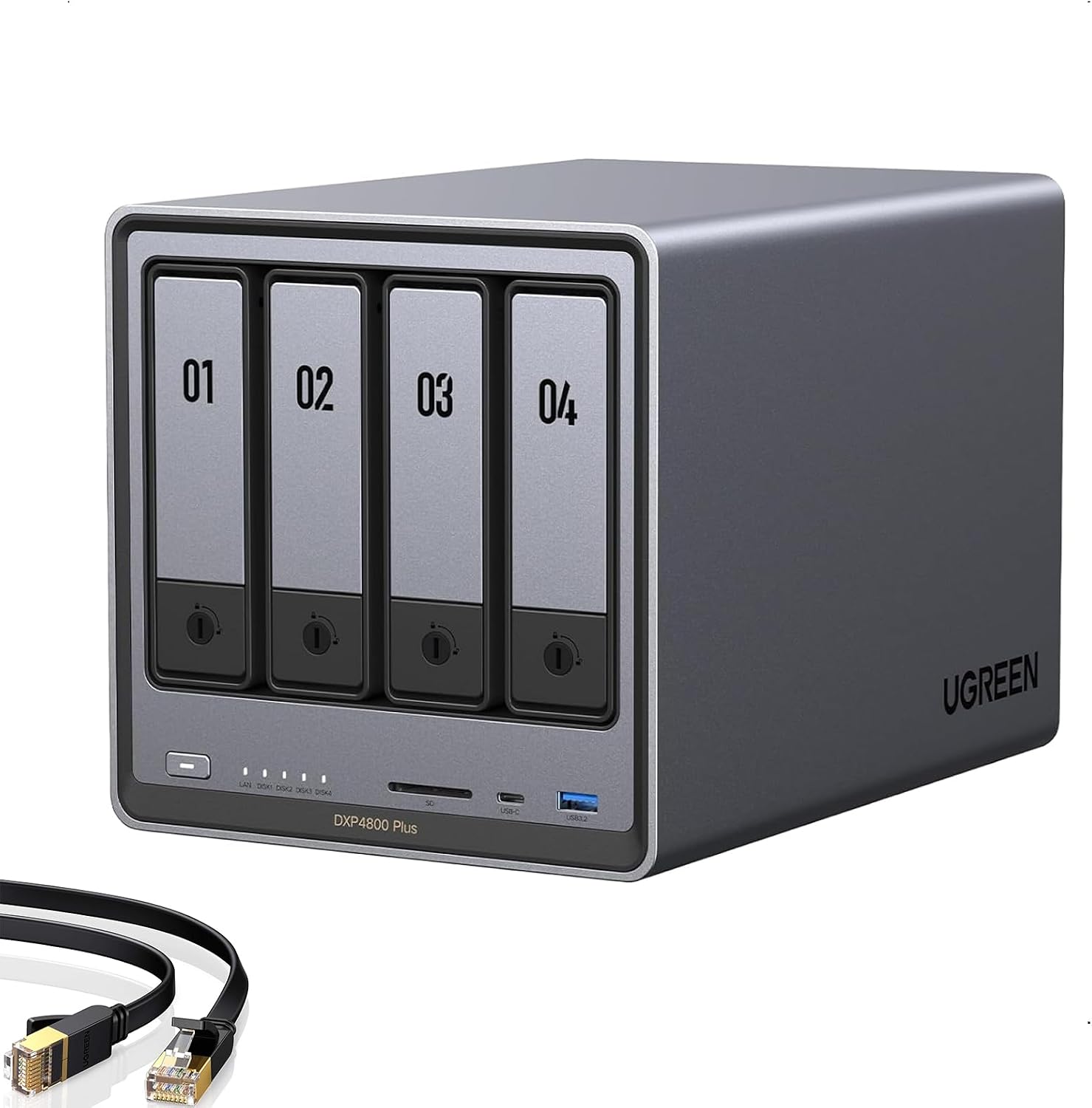
- Best for: Users who want fast networking, high storage capacity, DDR5 memory, and a capable server platform for demanding IP camera systems.
- Not ideal if: You want a simple NVR appliance that requires little configuration.
The UGREEN DXP4800 Plus is a high-performance 4-bay NAS that can be used as an NVR server for users who want fast networking, flexible storage, and additional server capabilities.
It combines an Intel 5-core processor with 8GB of DDR5 memory, 10GbE networking, a built-in 128GB SSD, and dual M.2 NVMe slots.
With support for up to 144TB of storage, the DXP4800 Plus provides plenty of capacity for storing surveillance footage while also leaving room for backups, file storage, media, and other workloads.
Key Highlights
Storage
- 4 × 3.5-inch SATA drive bays
- Up to 144TB storage capacity
- Built-in 128GB SSD
- 2 × M.2 NVMe slots
- RAID support
- SATA 6Gb/s support
Performance & Networking
- Intel 5-core processor
- 8GB DDR5 RAM
- 1 × 10GbE network port
- 1 × 2.5GbE network port
- Transfer speeds of around 1,250 MB/s
Server Features
- Docker support
- Virtual machine support
- Remote access and file sharing
- Automatic backups
- Hardware transcoding
Other Features
- 4K HDMI output
- Multiple USB ports, including 10Gbps USB
- Compatible with third-party hard drives
- 2-year manufacturer warranty
- Diskless configuration
Why We Like It
- The DXP4800 Plus stands out because of its high-speed networking.
- A 10GbE connection provides substantially more bandwidth than the 1GbE networking found on many basic NAS and NVR systems, making it well suited to installations where multiple devices are accessing large amounts of recorded footage.
- Its 8GB of DDR5 memory and Intel processor also give it considerably more flexibility than a basic storage appliance.
- In addition to surveillance workloads, the server can handle backups, file sharing, media management, Docker containers, and virtual machines.
- The built-in 128GB SSD and two M.2 NVMe slots provide additional flexibility for system storage, caching, or other supported storage configurations, while the four SATA bays provide the main capacity for large data sets such as surveillance recordings.
- Another advantage is its 144TB maximum storage capacity, giving users plenty of room to retain surveillance footage for longer periods without immediately needing an expansion chassis.
Things to Keep in Mind
- The DXP4800 Plus is not a traditional dedicated PoE NVR. It does not have built-in PoE ports for directly powering IP cameras. Cameras will instead need to connect through your network, typically using a PoE switch.
- It is also diskless, so the hard drives required for surveillance storage must be purchased separately. Make sure the drives you choose are appropriate for continuous surveillance recording.
- The DXP4800 Plus is also more suitable for users comfortable with NAS and server configuration. If you simply want to connect cameras to a dedicated NVR and start recording, a conventional PoE NVR will generally be easier to deploy.
Bottom line: A high-performance NVR server for users who prioritize 10GbE networking, DDR5 memory, NVMe storage, and a flexible platform for surveillance and other workloads.
4. ASUSTOR Lockerstor 4 Gen2+ AS6704T v2 (Best for High-Speed Networking)

- Best for: Users who want fast network connectivity and extensive NVMe SSD options for a flexible NVR server.
- Not ideal if: You only need basic surveillance recording and don’t need high-speed networking or extensive SSD flexibility.
The ASUSTOR Lockerstor 4 Gen2+ AS6704T v2 is a 4-bay NAS server that can be used as a flexible NVR platform for users who want high-speed networking and extensive SSD options.
It combines an Intel Celeron N5105 quad-core processor with dual 5GbE networking, four M.2 NVMe slots, and support for both HDD and SSD storage.
Its combination of four SATA drive bays and four NVMe slots gives it plenty of flexibility for building a surveillance server with large-capacity storage while using SSDs for caching or additional high-performance storage.
Why We Like It
- The Lockerstor 4 Gen2+ stands out because of its dual 5GbE networking.
- For an NVR server, faster networking can be particularly useful when multiple cameras are continuously sending video to the server or when several users need to access recorded footage simultaneously.
- The other major advantage is the four M.2 NVMe slots. Instead of limiting users to SATA storage, the AS6704T v2 provides several options for adding high-speed SSD storage or cache.
- It also provides strong storage flexibility. You can install large SATA hard drives for surveillance footage while using NVMe SSDs for workloads where faster storage performance is beneficial.
- ASUSTOR’s support for RAID 0, 1, 5, 6, and 10 also gives you several ways to balance storage capacity, performance, and data protection.
Things to Keep in Mind
- The AS6704T v2 is not a dedicated PoE NVR. It doesn’t have built-in PoE ports for directly connecting and powering IP cameras. Cameras will need to communicate with the NAS through your network, typically using a PoE switch.
- It is also diskless, so you’ll need to purchase the HDDs or SSDs separately. For surveillance recording, choose drives designed for the continuous workload associated with recording video around the clock.
- The system is also better suited to users who want a flexible NAS-based NVR server rather than a simple plug-and-play surveillance recorder. Setting up the surveillance software and network may require more configuration than a dedicated NVR.
Bottom line: A flexible NVR server for users who prioritize dual 5GbE networking, NVMe SSD support, and high-speed storage alongside traditional SATA surveillance storage.
5. HPE ProLiant MicroServer Gen11 (Best Server-Grade NVR Server)

- Best for: Users who want a customizable server-grade platform for building a powerful IP camera surveillance system.
- Not ideal if: You want a simple NAS-based NVR or plug-and-play recorder.
The HPE ProLiant MicroServer Gen11 is the most traditional server option on this list, making it a strong choice for users who want to build a more powerful and customizable NVR system.
It combines an Intel Xeon processor, expandable DDR5 memory, four large-form-factor drive bays, and server-grade management and security features in a compact tower.
Unlike a dedicated PoE NVR, the MicroServer Gen11 gives you a general-purpose server platform that can run Windows Server or Linux and can be configured around the NVR software and storage setup you prefer.
Why We Like It
- The biggest advantage of the MicroServer Gen11 is its server-grade hardware and expandability.
- The Intel Xeon E-2434 and 32GB of DDR5 memory provide a stronger starting point than many entry-level NAS systems, while the ability to expand to 128GB gives you plenty of room for a more demanding NVR setup.
- It also has four LFF drive bays and two PCIe expansion slots, allowing you to build the storage and hardware configuration around your surveillance requirements.
- Another major advantage is HPE iLO 6 remote management. This lets the server be managed remotely, which can be particularly useful when the NVR is installed somewhere that isn’t convenient to access physically.
- The compact tower design is also practical for a small office or other location where you need server-class hardware without a large rack-mounted system.
Things to Keep in Mind
- This is not a dedicated plug-and-play PoE NVR. You’ll need NVR/VMS software and a separate PoE switch or other method of connecting your IP cameras.
- The included configuration also comes with only one 4TB hard drive, so users recording many cameras or keeping footage for long periods may want to expand the storage.
- It’s also considerably more server-oriented than the NAS systems above it. If you simply want an easy-to-manage NVR with built-in surveillance software, a NAS such as the QNAP or Synology may be easier to set up.
Bottom line: A server-grade NVR platform for users who want Xeon performance, expandable memory, PCIe expansion, remote management, and maximum control over their surveillance software and hardware configuration.
Final Recommendations
- Best overall: QNAP TS-464-8G-US
- Best scalable NVR server: Synology DS1525+
- Best high-performance NVR server: UGREEN DXP4800 Plus
- Best for high-speed networking: ASUSTOR Lockerstor 4 Gen2+ AS6704T v2
- Best server-grade NVR server: HPE ProLiant MicroServer Gen11
FAQ
What is an NVR server?
An NVR server is a NAS or general-purpose server configured to record and manage IP camera footage using NVR or VMS software. Unlike a traditional NVR appliance, it can also be used for file storage, backups, applications, virtualization, and other workloads.
Can I use a NAS as an NVR server?
Yes. NAS systems from manufacturers such as QNAP, Synology, and ASUSTOR can be configured for surveillance recording using compatible surveillance software.
Do NVR servers have built-in PoE?
Generally, no. The NAS and server platforms in this guide do not have built-in PoE ports like traditional PoE NVRs. IP cameras normally connect through a separate PoE switch or network switch.
Do I need NVR software?
Yes. A NAS or server by itself is primarily a storage and computing platform. You need compatible NVR/VMS software to record, manage, and view camera footage.
Are NVR servers better than traditional NVRs?
They serve different purposes. A traditional NVR is usually easier to deploy and is designed specifically for surveillance, while an NVR server provides more flexibility for storage, software, networking, backups, and other workloads.
How much storage do I need for an NVR server?
Storage requirements depend on the number of cameras, resolution, frame rate, compression, bitrate, and how long you want to retain recordings. More drive bays allow you to install greater storage capacity and configure redundancy.
Can I use an NVR server with IP cameras from different brands?
Yes, provided the NVR/VMS software supports the cameras and protocols they use. ONVIF and RTSP support can make multi-brand camera deployments easier.
Do NVR servers need to run 24/7?
Yes. If the server is responsible for continuous surveillance recording, it generally needs to remain powered on continuously.