
Choosing an ONVIF-compatible NVR is the smartest way to avoid being locked into one camera brand. These systems let you mix and match cameras while still getting reliable recording, high bandwidth, modern compression (H.265/H.265+), and secure remote access.
This guide is for homeowners and businesses who want a flexible, wired ONVIF NVR that supports third-party cameras, offers local recording (no subscriptions), and works reliably long-term.
TL;DR – Best ONVIF NVRs (Quick Picks)
| Product | Best For | Main Advantage |
|---|---|---|
| Hikvision DS-7608NI-M2/8P Check Price on Amazon | Best Overall | Excellent ONVIF compatibility, 8-channel PoE, and support for cameras up to 32MP |
| OOSSXX 8CH 4K PoE NVR Check Price on Amazon | Best Budget | Affordable ONVIF-compatible PoE NVR with excellent value |
| Hikvision DS-7604NI-Q1/4P Check Price on Amazon | Small Systems | Compact smart ONVIF NVR with PoE |
| TP-Link VIGI NVR1008H Check Price on Amazon | Home Users | Simple plug-and-play ONVIF setup |
| Uniview NVR301-04X Check Price on Amazon | Enterprises | Strong multi-profile ONVIF + RTSP support |
| Blue Iris Check Price on Amazon | Software Power Users | Most scalable and customizable ONVIF solution |
Good to Know Before Buying
- All systems below support ONVIF for multi-brand camera use
- Most AI detection happens inside the cameras, not the NVR
- H.265/H.265+ saves significant storage compared to H.264
- Wired NVR systems are more stable than Wi-Fi or cloud cameras
- Software NVRs scale more, hardware NVRs are easier to maintain
How to Choose the Right ONVIF NVR
How many cameras do you need?
- 4 channels → small homes or offices
- 8 channels → most homes or small businesses
- 16+ channels → warehouses, commercial, or large properties
Which ONVIF profiles matter?
- Profile S = required for video streaming
- Profile T = better compression + event handling
- Profile G = storage management (nice bonus)
Is bandwidth important?
- Yes. Higher Mbps input = smoother multi-camera recording, especially at 4K+.
Do you need PoE?
- Not required for ONVIF, but strongly recommended for clean installs and reliability.
Hardware vs software NVR?
- Hardware = simpler, quieter, more stable
- Software (Blue Iris) = unlimited scalability and customization
Best ONVIF NVRs (Detailed Reviews)
1. Hikvision DS-7608NI-M2/8P (Best Overall)
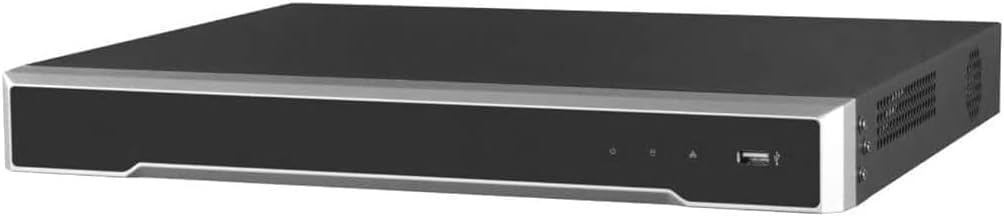
- Best for: Homeowners, small businesses, and installers who want a powerful, future-proof ONVIF NVR with excellent camera compatibility and enough capacity for most 8-camera systems.
- Not ideal if: You need more than 8 cameras or want the cheapest possible NVR.
The Hikvision DS-7608NI-M2/8P is our Best Overall ONVIF NVR thanks to its excellent combination of camera compatibility, high bandwidth, built-in PoE, high-resolution support, and strong overall performance. With 8 independent PoE ports, 128 Mbps incoming bandwidth, and support for cameras up to 32MP, it provides plenty of performance for high-resolution IP camera systems while keeping the setup relatively compact.
Key Highlights
Video & Performance
- Supports up to 32MP IP cameras
- 128 Mbps incoming bandwidth
- 256 Mbps outgoing bandwidth
- Supports up to 8 IP cameras
Installation
- 8 independent built-in PoE ports
- HDMI output up to 8K
- Supports 4K output at up to 60Hz
Compatibility
- ONVIF support
- Works with compatible third-party IP cameras
- Supports high-resolution IP camera systems
Why We Like It
- Excellent balance of performance, compatibility, and price
- 8 PoE ports provide enough capacity for most small and medium-sized systems
- Supports extremely high-resolution cameras
- 8K HDMI output provides plenty of display capability
- Compact 8-channel design is easier to size appropriately for smaller systems
Things to Keep in Mind
- 8 channels may not be enough for larger surveillance installations
- Higher cost than basic entry-level NVRs
- AI features depend on camera compatibility
- Hard drive is not included
Bottom line: The best overall ONVIF NVR for users who want excellent compatibility, high performance, and high-resolution support without paying for a larger 16-channel recorder.
2. OOSSXX 8CH 4K PoE NVR (Best Budget)
Best for: Homeowners and small businesses looking for an affordable ONVIF-compatible NVR with built-in PoE and reliable 4K recording.
Not ideal if: You need enterprise-grade management features or seamless compatibility with every third-party ONVIF camera.
The OOSSXX 8CH 4K PoE NVR is an excellent budget-friendly ONVIF recorder that offers built-in PoE, 4K recording, H.265+ compression, and support for third-party ONVIF cameras. It provides an affordable way to build or upgrade a flexible multi-brand surveillance system without sacrificing the essential features most users need.
Key Highlights
Video & AI
- Supports up to 4K (8MP) recording
- AI human detection support
Storage
- 1 SATA bay, up to 8TB
- Hard drive not included
Installation
- 8 built-in PoE ports
- ONVIF-compatible with manual camera configuration
Why We Like It
- Excellent value for budget-conscious buyers
- Built-in 8-port PoE switch
- H.265+ compression improves storage efficiency
- Supports most ONVIF-compatible IP cameras
Things to Keep in Mind
- Some ONVIF cameras require manual configuration
- Hard drive sold separately
- Fewer advanced features than premium ONVIF NVRs
Bottom line: The best budget ONVIF NVR for users who want dependable 4K recording, built-in PoE, and the flexibility to use compatible third-party IP cameras without overspending.
3. Hikvision DS-7604NI-Q1/4P (Best for Small Systems)

- Best for: Small homes or offices needing a compact ONVIF NVR with PoE.
- Not ideal if: You need more than 4 cameras.
The Hikvision DS-7604NI-Q1/4P NVR offers strong performance, smart analytics support, and built-in PoE in a compact design, making it ideal for small but serious setups.
Key Highlights
Video & Storage
- Supports up to 4K output
- H.265+ compression
- Up to 8TB HDD
Installation
- 4 built-in PoE ports
- Dual HDMI + VGA outputs
AI & ONVIF
- ONVIF compatible
- Supports smart analytics with compatible cameras
Why We Like It
- Great performance in a small form factor
- Smart analytics support
- Plug-and-play PoE setup
Things to Keep in Mind
- Limited to 4 cameras
- Storage expansion limited to one HDD
Bottom line: A compact, smart ONVIF NVR for smaller surveillance systems.
4. TP-Link VIGI NVR1008H (Best for Home Users)

- Best for: Homeowners who want a simple ONVIF NVR with PoE.
- Not ideal if: You want advanced AI analytics.
The TP-Link VIGI NVR1008H focuses on simplicity. It offers 24/7 recording, built-in PoE, and easy mobile access, making it perfect for DIY home surveillance.
Why We Like It
- Very easy setup with built-in PoE
- Reliable 24/7 recording
- H.265+ compression saves storage
- Clean mobile app experience
Things to Keep in Mind
- Basic AI only
- Playback limited to 4 cameras at once
Bottom line: A simple, reliable ONVIF NVR for home users.
5. Uniview NVR301-04X (Best for Enterprises)

- Best for: Offices and commercial users needing multi-profile ONVIF + RTSP support.
- Not ideal if: You only need a basic home system.
Uniview’s NVR301-04X is a professional-focused ONVIF NVR with strong compatibility, modern compression, and enterprise-style stability.
Why We Like It
- Supports ONVIF Profiles S, G, and T
- Also supports RTSP cameras
- Ultra 265 compression saves storage
- Stable and enterprise-grade
Things to Keep in Mind
- This model supports only 4 channels (larger versions available)
- AI depends on connected cameras
Bottom line: A strong enterprise-style ONVIF NVR with broad camera compatibility.
6. Blue Iris (Best Software ONVIF NVR)

- Best for: Power users who want unlimited scalability and customization.
- Not ideal if: You want a plug-and-play hardware solution.
Why We Like It
- Supports up to 64+ cameras
- Advanced automation and motion rules
- Works with almost any ONVIF camera
- Extremely flexible and scalable
Things to Keep in Mind
- Requires a dedicated PC running 24/7
- More complex setup than hardware NVRs
- Performance depends on PC specs
Bottom line: The most powerful and scalable ONVIF solution for advanced users.
Final Recommendations
- Best overall: Hikvision DS-7608NI-M2/8P
- Best budget: OOSSXX 8CH 4K PoE NVR
- Best for small systems: Hikvision DS-7604NI-Q1/4P
- Best for home users: TP-Link VIGI NVR1008H
- Best enterprise alternative: Uniview NVR301-04X
- Best software NVR: Blue Iris
FAQ
Yes. Internet is only required for remote access, not recording.
Profile S is essential. Profile T and G are strong bonuses.
Most rely on camera-side AI, not NVR-side processing.
Yes, that’s the main advantage of ONVIF compatibility.
No. PoE only powers cameras, ONVIF works with or without it.